Plugin platform · Rokid AR glasses
Install a phone app,
get a glasses app.
One hub lives on the glasses and renders everything. Every feature ships as an ordinary Android APK on your phone — and nothing is ever installed on the glasses again.
- 20 plugins in the Store
- 1 gesture claimed
- 0 cables, PCs, or ADB
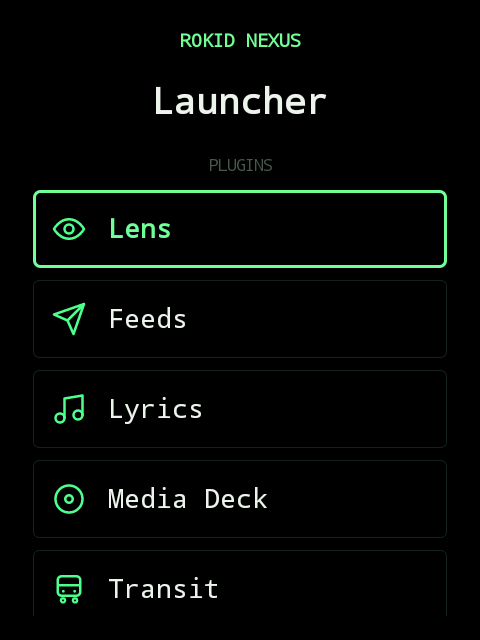
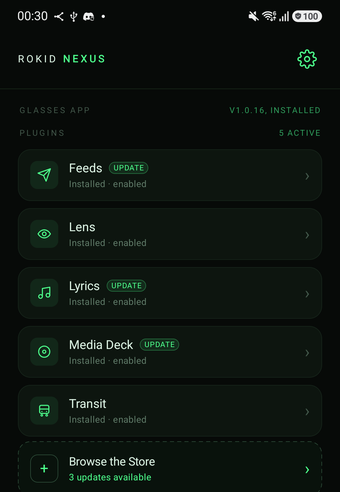
Navigation keeps your Google Maps, Citymapper, OsmAnd, Organic Maps or Yandex Maps route on the glasses ·
activities move as one shape · typing in a band leaves the app behind in
view · update both hubs together ·
SDK sdk-v0.21.0 on JitPack · Apache-2.0
Roadmap
No dates and no marketing. What is done, what is being written now, what is committed, and the problem each one actually solves — including the ones that turned out to be harder than they looked.
-
1.5.0
Navigation, from the apps you already use
Start a route in Google Maps, Citymapper, OsmAnd, Organic Maps or Yandex Maps and it stays on the glasses as one live activity: the next turn and its distance, or the walk to the stop, the line to board and the stops left. The moment that matters — a turn a few metres away, the stop to get off at — beats once so it is not missed.
Under the hood
Nexus routes nothing and draws no map: the plugin reads the guidance those apps already post as notifications, so it follows whatever route you chose in them. The activity became one sprung outline for it, with a line badge, a second quantity beside the value, a row of dots for stops and an urgent beat, all in SDK 0.21.0 and open to any plugin.
-
1.4.13
Reply inside the notice
Tap Type on a Relay notice and the notice itself becomes the reply field: what you type on the phone appears under the message as you type it. The phone keyboard opens on its own when the glasses ask for text, and closes when you send.
Under the hood
The band is an overlay that never takes focus, so it cannot hold a text field. The real field stays on the glasses, out of sight, and the band draws a local copy of its text and caret; nothing crosses the bus before the single commit. Since 1.5.0 the app behind stays in view while you type. Plugins opt in with
EditableSurfaceField.inNoticein SDK 0.20.0. -
1.4.12
The glasses only talk to your phone
The Bluetooth channel between the two hubs used to accept any device in range. Now each end proves it holds a key the phone enrolled over the authorized Rokid link, and every frame carries a signature and a counter, so nothing can be injected, replayed, or read by a stranger's phone.
Under the hood
Contributed by Mike Sviblov. A four-record HMAC-SHA256 handshake derives one key per direction; the pairing key lives in the Android Keystore on both sides and follows the glasses' CXR identity. Both hubs must be on 1.4.12: an older peer is refused and only the Rokid control link remains until it is updated.
-
1.4.11
A notice answers the question you saw
Replies, gestures and dismissals are bound to the notice and the question on screen, so a late tap can never act on its replacement. A notice keeps the keys over whatever is underneath, and a reply the link rejected says Delivery not confirmed instead of risking a second send.
Under the hood
Notice protocol v5 needs both hubs on 1.4.11; plugins rebuilt on SDK 0.19.0 also filter stale callbacks already queued. The phone hub now hands notices, pins, activities, surfaces and Ink to separate routers, and an SPP drop no longer silences a live notice's callbacks.
-
1.4.10
Listening with the display asleep
A plugin holding the microphone can let its surface go and keep listening. The display sleeps, the launcher is free, and the phone says Listening in the background with a Stop beside it.
Under the hood
Not a background-work permission: without an open audio lease there is nothing to keep alive. Releasing, revoking or losing the lease always ends it; reopening the plugin resumes it.
-
foundation
The bus, and the identity it enforces
Any APK may bind to the hub; installing one grants it nothing. A plugin is package + plugin id + signing certificate, and each capability is a separate grant, checked at the hub on every message.
Under the hood
Ten capabilities today —
surfaces,ink_surface,microphone,stt,tts,camera,http_proxy,mediasync,assistant,wireless_debugging. A plugin does not have to be running: the hub binds it awake when traffic arrives, measured at ~1.6 s including cold start. -
foundation
One link, two paths, and the hub picks
Control messages ride CXR-L; anything binary — images, photo sync — goes over SPP. A plugin never chooses, and never learns which path its bytes took.
Under the hood
1.1.1 flipped that order to route around a link that reported sends it had not delivered, and 1.1.2 flipped it back: SPP is one RFCOMM channel with one write lock, so a control message queued behind a photo chunk waits for the whole chunk. The real fix is an acknowledgement, not a different running order.
-
foundation
Setup without a computer
Seven steps on the phone, the glasses app pushed over the Rokid link, then a two-card self-arm on the glasses. No cable, no PC, no ADB at any point.
Under the hood
Wireless Debugging self-pairing with an app-private KADB TLS identity and a detached watchdog — the classic ADB key is never touched, so nothing on a PC is ever enrolled. Navigation reads the firmware's own localized labels, so it works in every language the ROM ships.
-
foundation
The distribution loop, closed
The SDK publishes to JitPack from
sdk-v*tags, a manifest PR lands a plugin in the public registry, and the in-app Store verifies SHA-256 and signer before the install runs.Under the hood
Provenance is checked in a fixed order — commit, tag, build, publish. Everything self-updates afterwards: phone from releases, glasses over CXR, plugins from the Store. Since 1.4.7 the tests of both hubs and every plugin run on each push, and a release that fails them is not published.
-
foundation
All five display tiers, and the motion under them
Ambient, pin, activity, notice, surface — plus a shared glyph set, plugin marks sent as bare geometry, and a status row along the bottom of every plugin surface.
Under the hood
Three duration tokens and two interpolators, nothing a plugin can dial. Native Views, not a WebView: the WebView spike rendered the same motion for ~1.2 cores, +88 MB PSS and 2.2 s to first paint, against 7.7 % CPU. Activities moved to springs in 1.5.0. The status row — phone charge, date, glasses charge — arrived in 1.4.8. Only a notice, or an activity's significant update that asked for it at start, may pulse a dark display awake, at most once every five seconds across every plugin, and never held on.
-
foundation
The camera capability
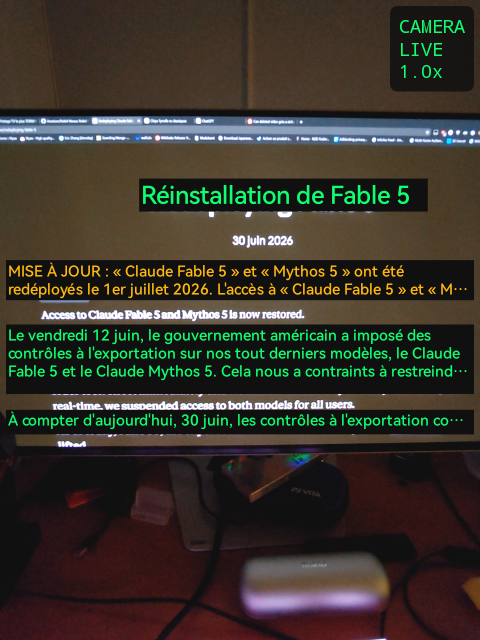
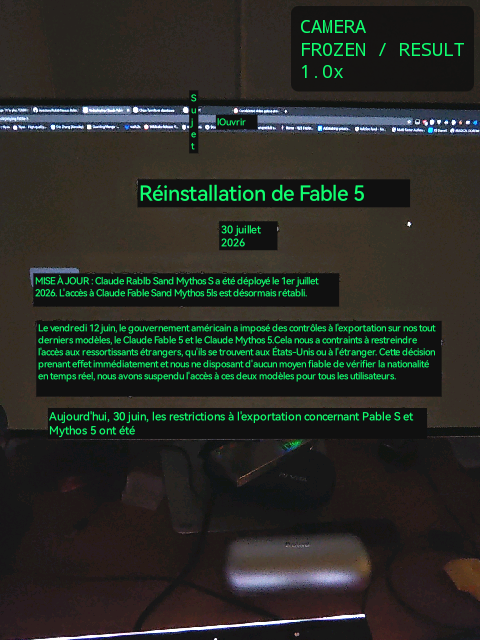
The glasses stream live H.264 and the plugin decodes on the phone, where ML Kit runs OCR and translation offline. No glasses-side plugin code exists.
Under the hood
A phone app cannot switch its own Wi-Fi on, which used to be a dead end. Now the roles invert — the phone hosts a
LocalOnlyHotspotand the glasses join it — and the wire protocol, the decode, the overlays and freeze are unchanged. -
1.4.9
Speech, in both directions
stttakes words from your mouth,ttssays them back with your phone's voice — through the glasses or your earbuds, never the phone's own speaker. How long it waits for you is now a setting.Under the hood
Voice and speed are picked once, for everything that speaks. Opening the microphone silences speech, or the glasses would record their own voice into your dictation. Patience covers both the wait for the first word and the pause that ends a sentence; the Android recognizer only starts once you do.
-
1.4.1
Ink Surface
A plugin sends a strict subset of Rokid's
.inkformat; the phone compiles it and the glasses draw it as native Views. Charts, progress, tap actions, inline Lottie — no WebView, no JavaScript, no page-side network. -
1.4.2
The phone as a remote for native glasses apps
List and open the apps already on the glasses, move focus, type into their fields, and drag the system's own pointer like a trackpad — in the Rokid launcher and in any third-party app.
Under the hood
The four
/core/*protocol families are hub-only and replay-safe; no plugin grant reaches them. Sensitive editors secure the phone window, and existing field contents never cross back to the phone. -
1.4.6
Typed input for plugins
A card can carry one text field. A keyboard bonded to the glasses works, and so does the phone's Keyboard & remote screen. Relay replies and Assistant notes came first. Built by ruruw.
-
1.4.8
The assist button, on your terms
A plugin can replace the glasses assistant without owning the button: hand it back to Rokid's assistant and the plugin stays one pick away in the launcher. Plugins are told why they were opened.
-
Display policies and ownership epochs
Foreground ownership, per-surface ordering, sequenced hides and image-decode invalidation already protect the normal handoff, and "newest notice wins" is a deliberate single-slot policy, not a missing queue.
Per-plugin mute, demote and notices-only, and hub-stamped ownership epochs, exist on development branches. They come back against a reproduced scenario, not as a global display rework on principle.
-
Continuous speech
Speech to text ships in short takes. Since 1.4.10 a microphone lease can outlive its surface, but that is not transcription that runs for minutes.
The missing slice is speech held open with partial results streaming to the HUD, and captions that survive the surface underneath changing. Live captions and translation need it; it waits for the first consumer that does.
-
Skills for Assistant
A hub-mediated registry so Assistant can pause music or ask Transit without binding another plugin or reimplementing it. The phone-typed ask that shared this row shipped in Assistant 1.4.7.
-
Native apps in the Nexus menu
The phone already lists and opens the apps on the glasses. Phase two puts them behind the same triple-tap that lists plugins, with a back that lands where you started. Nexus does not port them and does not wrap them.
-
A
navsurface kindManeuver glyph, distance, street, ETA, drawn by the platform — once Navigation's routes on real trips have shown which of its fields are stable. Activity extras carry it until then.
-
Maven Central
JitPack builds the SDK from tags and is fine for early adopters, but it is not something a serious app should depend on. Central goes out once the AIDL surface is a promise rather than a snapshot.
-
A control-plane acknowledgement
MediaSync already acks photo chunks. Glasses→phone CXR still reports success for frames the third-party client never sees, which is why outbound traffic prefers SPP. Another flip of running order is not the fix.
-
Native glasses apps are launched, never absorbed
Porting them into Nexus would make the platform responsible for software it did not write. The menu starts them; that is the whole relationship.
-
Plugin code stays on the phone
The glasses half of any capability lives in the hub. That is exactly what makes zero glasses-side deployment possible, and it is not negotiable.
-
No signature-only plugin permission
It would be the strongest trust model available, and it would also make third-party plugins impossible — no external developer can be signed with our key.
-
One host, one platform, for now
Hi Rokid Global and Android. Anything else is a promise we cannot currently keep on hardware we can test.
Five ways to be on the display
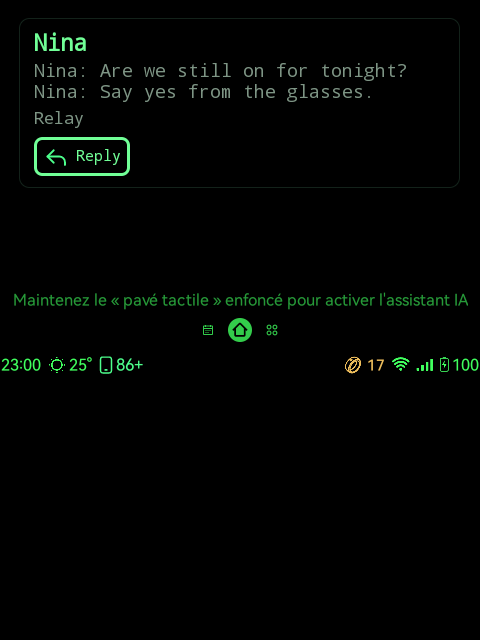
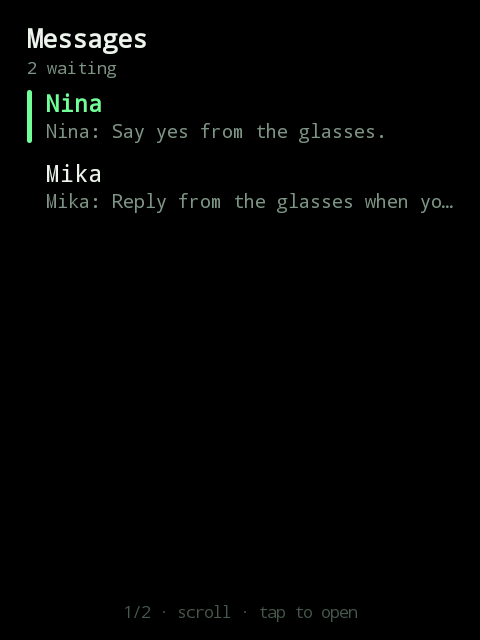
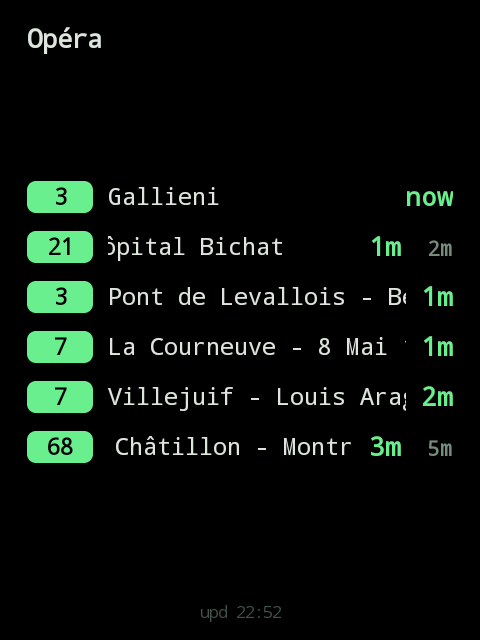
A plugin never picks how loudly it speaks. It declares what kind of thing it has, and the platform decides the form, the motion, and whether it may interrupt at all. Below is that renderer, reproduced — same phosphor, same 480×640 optic, same durations.
Hold the touchpad to talk to the assistant
Everything in its right place
Grey Prius · AB-123-CD · Rue de Rivoli
Nina
Nina: Are we still on for tonight?
Nina: Say yes from the glasses.
Scroll to choose · Back to dismiss
Opéra
- 3Gallieninow
- 21Hôpital Bichat1m
- 3Pont de Levallois1m
- 7La Courneuve2m
- 68Châtillon3m
upd 22:52
Timings are the platform's, not the plugin's: 180 ms for a value
refreshing in place, 280 ms for anything arriving or changing
shape, 240 ms for anything leaving — exits are quicker than
entrances. It runs on native Views because the WebView that rendered the same
motion cost ~1.2 cores, +88 MB and 2.2 s to first paint,
against 7.7 % CPU here.
The notice band's six states →
Twelve plugins, none of them built in
Every one is an ordinary phone APK installed from the in-app Store, pinned by hash and signer before it installs. The hub itself ships empty. These are real captures off the optic, uncropped.
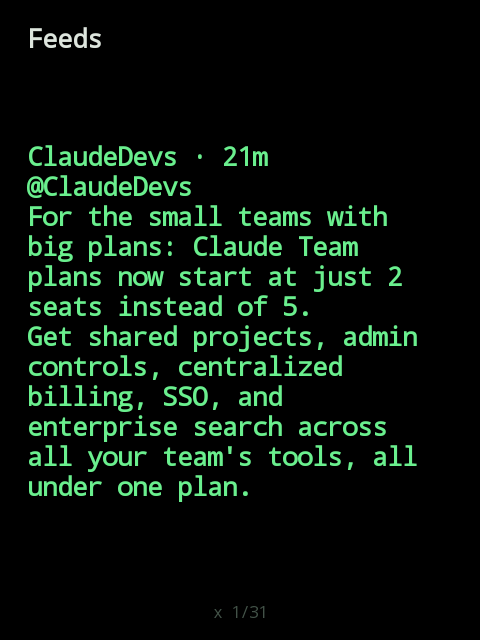
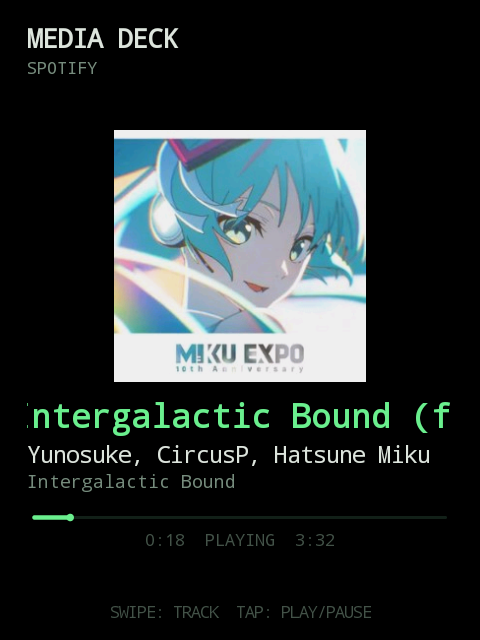
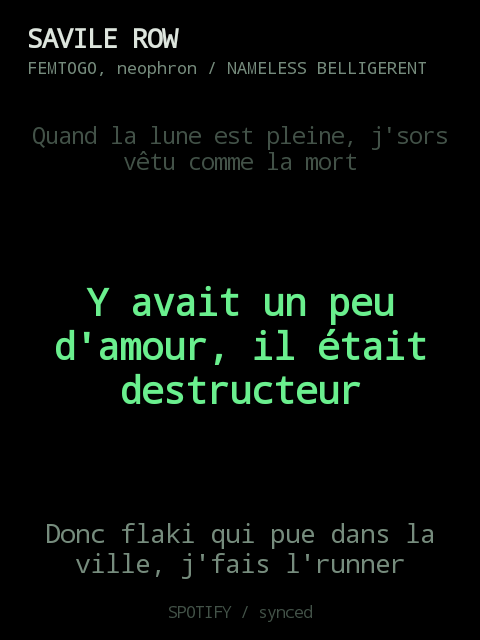
Installation alone grants nothing. Surfaces, Ink, microphone, speech to text, text to speech, camera, photos, HTTP proxy, the assistant slot and wireless debugging are approved one by one, per plugin, keyed to its package, its plugin id, and its signing certificate — and checked at the hub on every message, not at install time.
Ten more in the Store, by four other authors. They install, are granted, and run exactly like the eleven above — nothing here is reserved for first-party code.
- LumebeyondleviPDFs and text one word at a time, paced for reading on the move.
- AgendabeyondleviThe calendars your phone already syncs: what is next, first.
- NewsbeyondleviRSS and Atom feeds, headlines newest first, articles paged.
- Tuya Smart HomebeyondleviHome, room, device — and act on it from the glasses.
- Shopping ListVolundYour list on the HUD, ticked off with the R08 ring.
- Home AssistantZhilinConfigurable Home Assistant pages, one action per tile.
- OTPsZhilinOne-time codes lifted from notifications, shown for a moment.
- Taxi PlateZhilinThe active ride and its pickup timing, on the HUD while you wait.
- RokidHub · CodexAzat AkhmetshinCoding tasks by voice, routed through RokidHub to Codex.
- RokidHub · YandexAzat AkhmetshinYandex Smart Home by voice, answered on the HUD.
Relay
ordinary apps, not just messengers · an app picker for what may reach the eye
Assistant
music and Transit through hub skills, not by becoming those plugins
Navigation
OsmAnd walking and cycling checked on real trips · bus, tram and RER rides checked on real trips · Google Maps and Citymapper in languages beyond English, French and Korean · Korean checked on a real trip
Feeds
posting and replying by voice · more sources · video in the timeline
Media Deck
voice control — “next” and “pause” said instead of tapped
Photos Sync
a Wi-Fi-only rule · the location tag Android strips from videos
-
Agents, as a private alpha
Claude Code, Codex and OpenClaw sessions on the HUD: permission prompts as notices, progress on a pin, the next task dictated. Already in the tree, being reworked to speak Alleycat's protocol — the daemon behind litter — instead of a hand-rolled one. Not Store-listed until that rework lands.
A visual assistant, FoodFacts
camera capability, shipped
Sport HUD
activity tier + a small protocol addition · possibly fed by the R08 ring
Get started
Running it takes a phone and four steps. Writing for it takes one Gradle coordinate.
Run it
- Install the phone app. One APK from the releases page — it is the hub, the Store, and the setup guide.
- Follow the seven steps. The phone drives the pairing, turns the glasses' Wi-Fi on, and pushes the glasses app over the Rokid link.
- Say yes once, on the glasses. Enable accessibility when asked; Nexus bootstraps the rest of its glasses-side setup itself.
- Install a plugin from the Store. Everything keeps itself current afterwards.
No cable, no PC, no ADB at any point — including the privileged parts, which the glasses arm by themselves in two cards.
Write for it
- Depend on the SDK.
:bus-clientbrings the service base class, the typed surfaces, the lifecycle callbacks and the design kit. - Declare who you are. A headless service, a plugin id, a 24×24 mark in one green, and the capabilities you need — no launcher icon.
- Push a surface. Describe content, never pixels. Your process does not need to be running: the hub binds you awake.
- Publish, optionally. You host the APK, the registry indexes it, the Store pins your hash and your signer.
repositories { maven("https://jitpack.io") }

dependencies {
    implementation(
        "com.github.Anezium.Rokid-Nexus:bus-client:sdk-v0.21.0"
    )
}
Every limit in the contract is enforced in code — breaking one does not degrade gracefully. All documentation →